WhatsApp has become the primary communication tool for billions of people worldwide. From quick text messages to voice and video, we depend on it to connect with our friends and family. Although its calls work fine most of the time, sometimes they show errors that are hard to decode. Before you feel like the person is ignoring you, it’s important to know what WhatsApp says call not answered actually means. So, let’s find out!

WhatsApp Says Call Not Answered Meaning
The Call Not Answered notification pops up when you have fully rang a number, but the person has not answered the call. It means the call was delivered to them, and their internet connection was active, but your call was not picked up.
WhatsApp Call Status Messages With Meaning
WhatsApp sends different types of alerts during calls. Here are their meanings:
- Unavailable: If the calls cut after one beep, it may mean that you are blocked by the user on WhatsApp. If the call goes through until the end, the user’s phone is switched off or out of the coverage area.
- Declined: The call has been declined by the user.
- Reconnecting: There is a network or low connectivity issue.
- No Answer/Not Answered: The call was neither picked up nor declined by the user.
- Call Failed/ Unable to Initiate Call/ Couldn’t Place Call: The call was not placed due to network or connection errors.
- Connecting: Data saver mode is enabled.
What Does it Mean When WhatsApp Call Says Unavailable?
WhatsApp says a call is unavailable on several occasions, such as:
- The individual has switched off their phone.
- The user’s phone is in DnD mode.
- The individual is at a place where there isn’t an internet connection.
- Your number has been blocked.
- WhatsApp is uninstalled by the user.
How to Fix WhatsApp Call Unavailable but Message Delivered
If your calls are not going through repeatedly, try out these solutions:
Method 1: Check Your Internet Connection
The main problem can be an unstable internet connection or a low network area. Make sure you are connected to Wi-Fi if your cellular network is failing.
Method 2: Check App Permissions
If your app permission for audio or calls is accidentally disabled, then calls will not be available.
- Open Settings, scroll down, and tap on Apps.
- Scroll down and select WhatsApp.
- Then, turn the toggle on for Microphone.
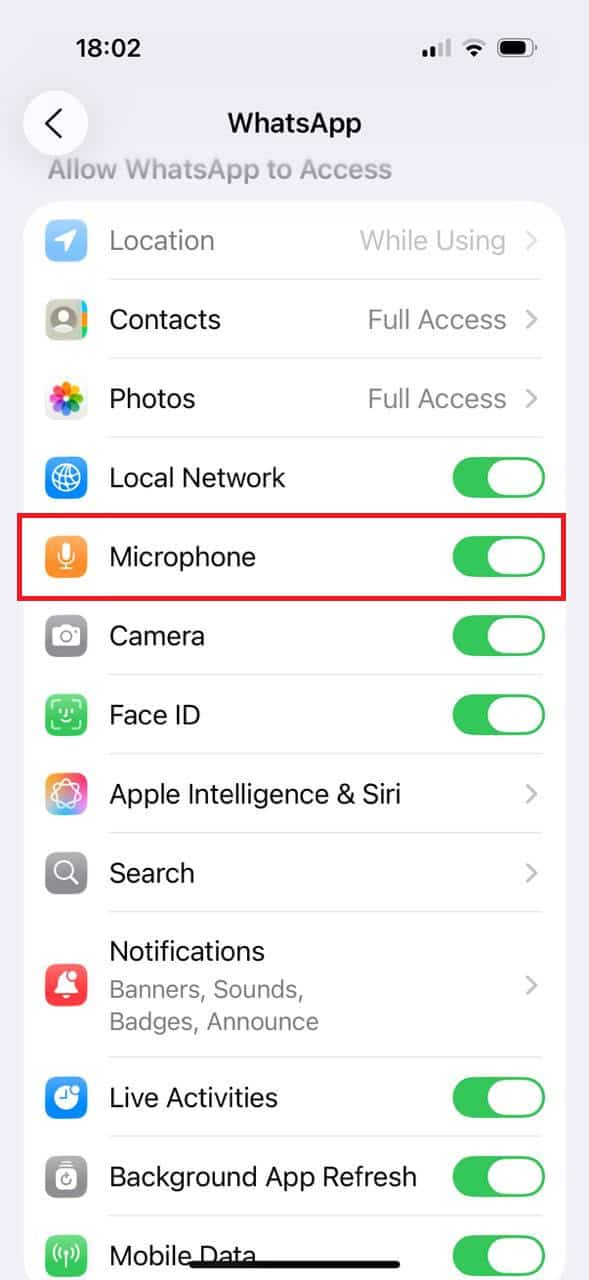
Now the app will have proper access to your calls.
Method 3: Contact’s Privacy Setting
If the other user has their phone set to Do Not Disturb or Focus mode, the calls are unlikely to ring. You can ask the person to check their phone directly.
Method 4: Restart Your Phone
The easiest way to fix any temporary glitches is simply restarting your phone. This will reset any minor setbacks, and your app should start working.
Method 5: Update and Reinstall WhatsApp
There can be some app glitches if your WhatsApp is running on an old version. Go to the Google Play Store or App Store and install the latest update.
Also Read: How to Start a Voice Chat in Group on WhatsApp
Now you will no longer have a difficult time figuring out why WhatsApp says call not answered after following this guide. For more helpful tips and tricks, stay tuned, and feel free to share your suggestions in the comments below.